How to Turn Off Read Receipts on Instagram? You might want to keep some privacy on Instagram and need more time to reply, or you might not want people to know exactly when you read their messages.
Disable off-read receipts can have more ways to help reduce stress or anxiety if you have read a message but haven’t replied. We’ll go over how to disable Instagram read receipts in this post.
How to Read Instagram Messages Without Seen? [DMs & Story Replies]
Only the Instagram apps for iPhone and Android allow users to turn off read receipts. Read receipts for specific chats, or all messages can be managed:
1. Disable Read Receipts for Specific Chat
The first step in turning off read receipts for a particular Instagram chat is to access your chat list.
- Tap the Instagram icon in the upper right corner.
- Tap the name at the top of the chat window to select the conversation you wish to manage.
- Next, find the Read Receipts Option under Privacy & Safety.
- To keep the other person from seeing when you have read their messages, turn it off.
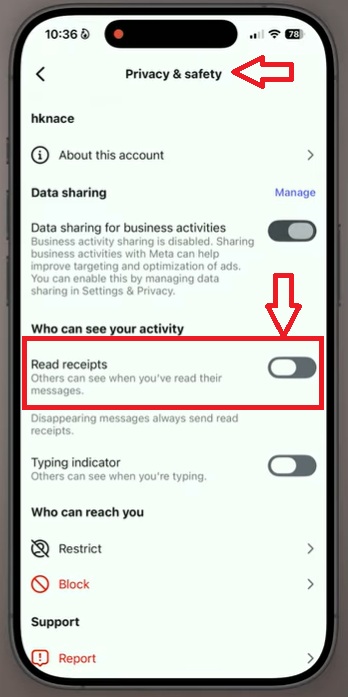
2. Disable Read Receipts for All Chat
In the second step, if you want to disable read receipts for all Instagram chats,
- Start by navigating to the bottom right corner of your Instagram profile.
- Then, select Settings and Activity, go to the “How Others Can Interact with You” section, and choose “Message and Story Replies.”
- After that, select Show Read receipts from the Who Can See You Online section and turn it off.
Users do not have a direct option in the settings until Instagram introduces a feature to disable read receipts. Don’t worry; there are a few ingenious ways to hide your message activity.
Best Alternative Methods to Disable Read Receipts on Instagram (2025)
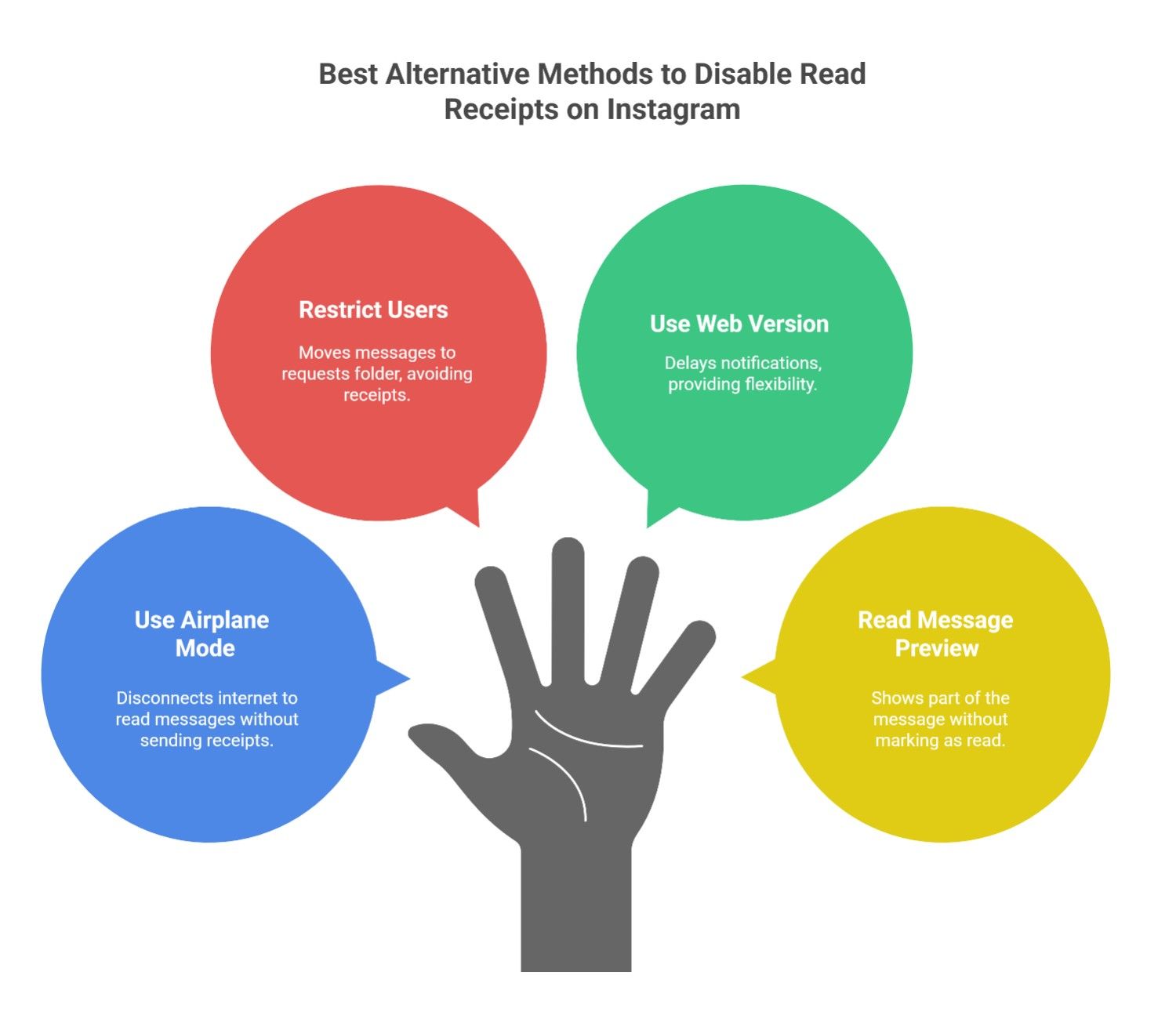
Here are some of the best alternative methods to read Instagram messages secretly in 2025.
1- Use Airplane Mode
A simple trick to read messages without sending a read receipt in DMs and story replies on Instagram is using Airplane Mode.
- Open Instagram and navigate to your direct messages.
- Turn on Airplane Mode, which disconnects your internet.
- Open and read the message.
- Close the Instagram app completely before turning Airplane Mode off.
Since you weren’t connected to the internet while reading, the notifications won’t be sent until you reopen the app online.
2- Restrict Users for Privacy
Instagram’s Restrict feature moves messages from specific users to your Message Requests folder. Messages in this section don’t show read receipts on Instagram DM unless you manually accept them. To restrict someone:
- Go to their profile.
- Tap the three-dot menu.
- Select Restrict.
This is a great way to avoid unwanted conversations while maintaining privacy.
3- Use Instagram’s Web Version
Accessing Instagram from a web browser can delay seeing Instagram notifications compared to the mobile app. If you’re not ready to respond immediately, checking your DMs on a computer might give you more flexibility before triggering a read receipt.
4- Reading the Message Preview
When you get a message on Instagram, you can view part of it in the notification panel without opening the app, and it won’t mark the message as read. However, you’ll only see a portion if the message is long.
Why Should You Turn Off Read Receipts on Instagram?
Read receipts on Instagram, and notify the sender when you’ve read their message. While this feature can be helpful for some, it often leads to unnecessary pressure.
If you value their privacy, these notifications can feel like an unwanted intrusion into your personal space. They can create situations where you might feel obligated to respond immediately or make you feel guilty for not replying quickly.
Here’s why many users are turning off read receipts on Instagram:
- Privacy concerns: You don’t want everyone to know when you read their messages.
- Avoiding unnecessary pressure: Not every message needs an immediate response.
- Keeping conversations casual: You can read messages without worrying about expectations.
- Reducing anxiety: Constantly being aware of read receipts can create social anxiety for some users.
Conclusion
Although there’s no direct option to answer, can you turn off read receipts in your Instagram settings? These methods can help you manage your messaging privacy. Until Instagram introduces an official feature, these strategies will help you keep your conversations private.
Try them out and share this guide with others who want to improve their Instagram message privacy options! Comment on your experience with “Can You Turn Off Read Receipts on Instagram?” and tell us which method was practical.
FAQ:
What Are Read Receipts on Instagram?
Read receipts on Instagram, which show when someone has seen your message, appearing as “Seen” under the chat.
How do I know if someone turned off read receipts on Instagram?
You won’t see “Seen” below your message even if they read it.
How do I turn off just “Seen” on Instagram?
You can’t entirely turn it off, but you can read messages in Airplane Mode or from notifications to avoid marking them as seen.
Can you turn off read receipts on Instagram Messenger?
Yes, you can disable read receipts for specific or all messages.
How to turn off read receipts on Instagram for iPhone?
You can do this by following the steps on the app, using Airplane Mode, or restricting the sender from reading messages without them knowing.