Want to know who has a fake Instagram account? First check the profile for signs that something is off. You can also Google the profile picture and see if it pops up anywhere else. These checks can help you identify a fake account but don’t always tell you who’s behind it. If someone copies someone else’s photo or sends spam or bothers you, you can report the account to Instagram.
In this guide, we will go over how to spot a fake profile, what to look for in a profile picture, how to report an account and how to stay safe from scams.
Can You Find Who Is Behind a Fake Instagram Account?
Finding out who’s behind a fake Instagram account isn’t easy. Instagram keeps private account details hidden from other users, so you can’t simply look up who owns a profile.
But there are a couple of clues you can look for. The profile picture may belong to someone else, the username may appear on other websites, or some details on the account may not line up.
If you find the same photo on another site, that can be a good clue, but it doesn’t tell you everything. Someone could have taken the picture, but that doesn’t prove who created the account or who is using it now.
Here are some steps you can try:
- Look at the profile details and what the account posts.
- Search the profile picture with Google Lens or TinEye.
- Check anything that seems off against trusted sources.
- Save proof and report the account if it breaks Instagram’s rules.
You don’t have to figure out who the person really is before you report a fake account.
How to Check If an Instagram Account Is Fake
Not sure if an Instagram account is real? Take a closer look at its profile before you trust it. Some small details may help you spot a fake account.
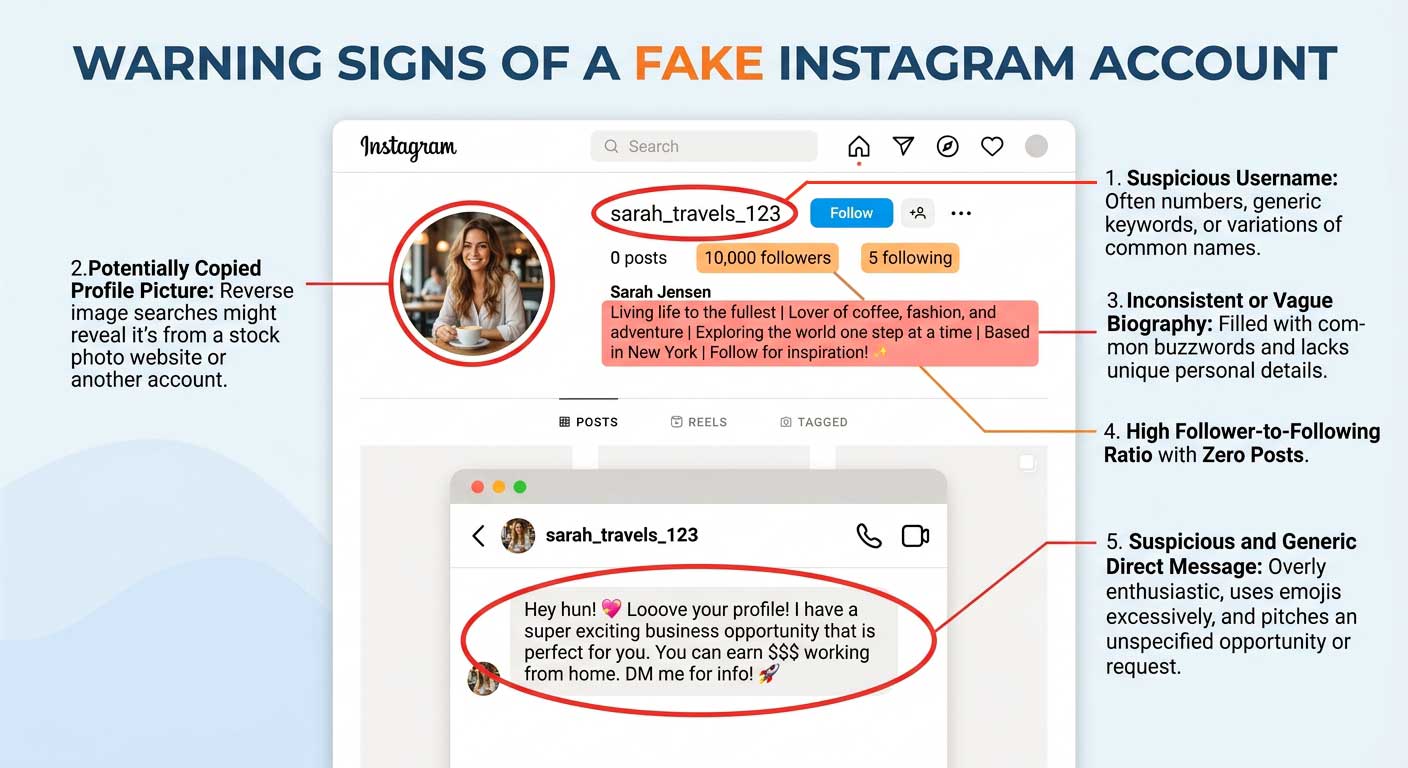
Here are a few things to look out for:
- A copied profile picture: The same photo appears on someone else’s account or another website.
- A similar username: The name looks almost the same as a real person’s or business’s username.
- Details that don’t add up: The bio, posts, or messages tell different stories.
- Strange messages: The account asks for money, passwords, login codes, or personal details.
- Unusual activity: It sends the same message to lots of people or shares links that seem unsafe.
- Claims that seem false: The account says it belongs to a company or a public figure, but you can’t find proof from a trusted source.
Of course, these signs don’t always mean an account is fake. Some people have new accounts, few followers, or only a handful of posts. Look at the full profile and check the facts before making up your mind.
Warning Signs of a Fake Instagram Account
Fake Instagram accounts can appear very similar to real ones. But if you look closely, you might notice a few things that seem off. Some red flags to watch for when reviewing a profile:
| Sign to Watch For | What It Could Mean | What to Do Next |
|---|---|---|
| The same profile photo appears elsewhere | Someone may have copied the image | Search for the photo and check where it came from |
| The username looks like a real account’s name | Someone may be pretending to be that person | Compare the usernames and check the official profile |
| The bio doesn’t match the posts | Some details may be false | Check the information against trusted sources |
| The account asks for money or login codes | It could be a scam | Don’t send money or share private information |
| The account has few posts or little history | It may be a new or inactive account | Look for other signs before deciding if it’s fake |
Check the Account’s Public Information
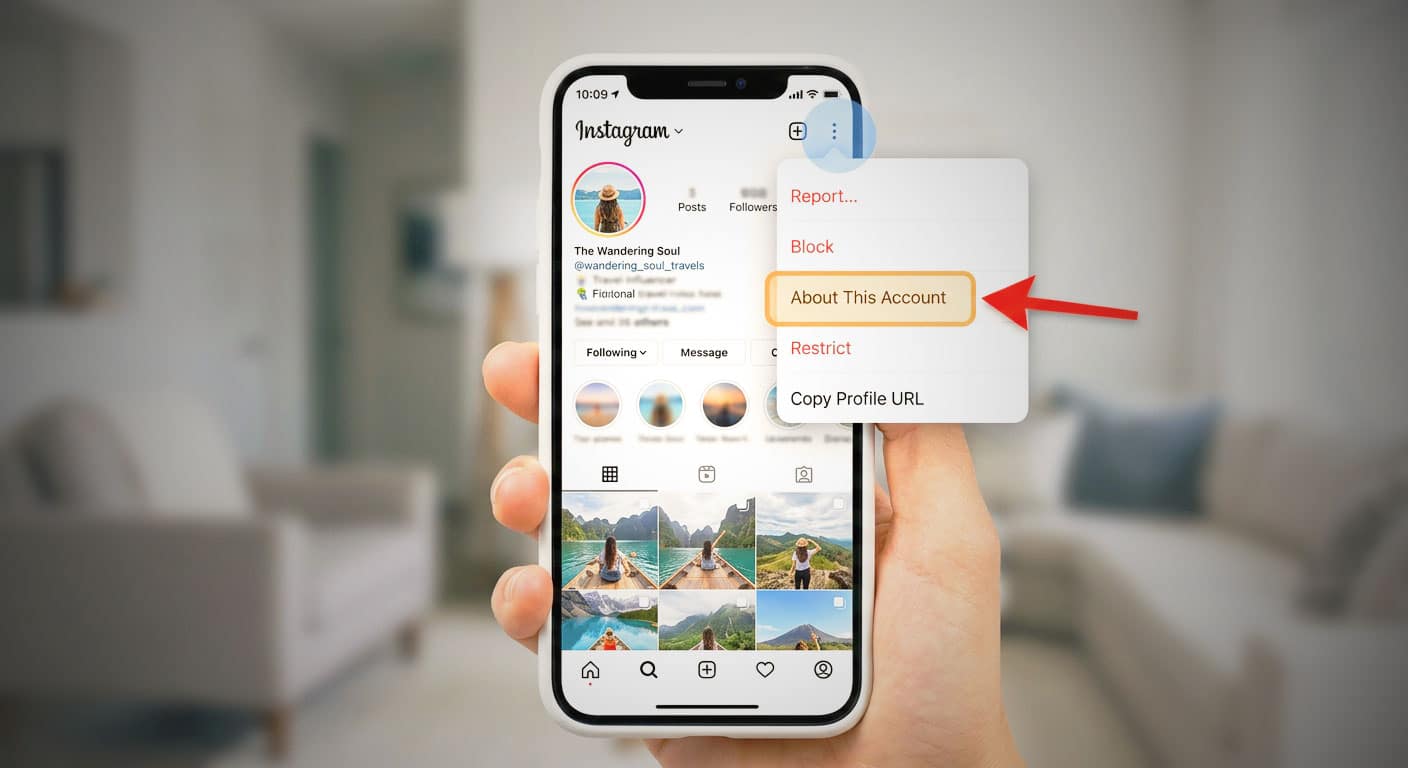
Before you try to find out who is behind a fake Instagram account, take a look at the details on its profile. Tap the three dots and see if there’s an About this account option. If there is, open it to check what Instagram shows. You may see when the account joined or if it has changed its username.
Here are a few things worth checking:
- When the account joined: If someone claims to be a famous person but their account was only created recently, it’s worth checking further. They could have a new account, so don’t judge by this alone.
- Old usernames: If Instagram shows past usernames, see if they make sense for the person or business the account claims to be.
- Links on the profile: If the account says it’s for a company or a public figure, visit their official website. See if it links to the same Instagram account.
- The username: Look closely at the spelling. A fake account might add a number, an extra letter, or a small symbol to make its name look like the real one.
These details can help you spot a fake account, but they won’t tell you exactly who runs it. Use them to decide whether the account seems real, and don’t assume you know who’s behind it just because something looks suspicious.
How to Reverse Image Search an Instagram Profile Picture
Seen a profile picture that looks like it belongs to someone else? Reverse image search will let you know if the same photo has appeared on other websites. This is useful if you think someone is using someone else’s picture to create a fake Instagram account.
But if you find the same photo, that doesn’t tell you who is running the account. It can help you find out where the picture is from, but that’s not the same as finding out who’s behind the profile.
Step 1: Save the Profile Picture
First, you’ll need a copy of the picture you want to search.
You can use EcoDownloader’s Instagram Profile Picture Downloader to save a publicly available profile picture. Enter the Instagram username or profile link, then download the image to your device.
If that doesn’t work, you can try taking a screenshot of the picture.
For better results, use the clearest image you can find. A blurry or very small picture may be harder to match, especially if it has been cropped or edited.
Step 2: Search With Google Lens
Google Lens lets you search the web using a picture instead of words.
Here’s how to use it:
- Open Google Lens or Google’s image search.
- Upload the profile picture you saved.
- Look through the results for the same photo or similar images.
- Open any results that look useful and check which website they come from.
- If you don’t find anything, try searching with a cropped part of the picture.
Google Lens may show pictures that look similar but aren’t the same one. Take a closer look at each result before deciding that you’ve found a match.
Step 3: Try TinEye
If Google Lens doesn’t help, try TinEye. It’s another tool that searches for copies of an image across websites in its database.
Upload the picture and check the results. If you find a match, open the website to see how the image is being used.
There’s one thing to know about TinEye: it generally doesn’t index images from social media sites like Instagram. So, even if the picture is being used on Instagram, TinEye may not find it.
You can read more in TinEye’s guide to its image index.
Step 4: Check What You Find
Found the same picture somewhere else? Don’t stop there. Open the page and check who posted it and what the picture is being used for.
Here are a few things to look at:
- The original source: Does the picture appear on the person’s own website or public profile?
- The captions: Do the names and details match the person in the picture?
- The dates: Was the photo posted somewhere else before it appeared on the suspicious account?
- Other details: Do the username, bio, and posts match what you found?
If you see the same photo on another site, it might mean someone copied it, but that doesn’t tell you who created the fake account or who is using it now.
What if you can’t find the picture anywhere? But that doesn’t mean the account is legit. The image may be new, edited or simply missing from search results. Try the other checks in this guide before you decide.
How to Understand Reverse Image Search Results
Have a photo similar to the one on the fake Instagram account? Have a closer look before you decide what it means. The results can give good clues but don’t necessarily tell the full story.
| What You Find | What It Could Mean | What to Do Next |
|---|---|---|
| The same photo is on someone’s public profile | Someone may have copied the photo | Compare the profiles and check whether the picture was used without permission |
| The photo appears on another website | The image may have been taken from that site | Open the page and see who posted it |
| The photo comes from a stock photo site | The picture may be a stock image | Check whether the account is pretending to be a real person |
| You find only similar pictures | The results may look alike without being the same photo | Don’t assume they show the same person |
| You can’t find the photo anywhere else | The search didn’t find a match | Try another tool or check the account in other ways |
Remember, finding the same photo doesn’t necessarily mean someone has created a fake account. People use the same photo for different purposes. Some photos are used on many different sites.
Better check more than one detail. For example, if the profile uses someone else’s photo, has a username similar to that person’s real account, and sends messages claiming to represent a business, there may be good reason to report it.
Even then you may not learn who runs the account. If you don’t have concrete proof that a profile is fake, don’t accuse the person of having a fake profile.
How to Report a Fake Instagram Account
If someone is using your photos, pretending to be you, or trying to scam people, you can report their Instagram account. You don’t need to know who is behind it to make a report.
Here’s how to report the account:
- Open the profile you want to report.
- Tap or click the three dots on the profile.
- Choose Report.
- Select the reason that best fits the problem, such as pretending to be someone else.
- Follow the steps on the screen to send your report.
The wording may be a little different depending on which version of Instagram you’re using.
For more help, read Instagram’s official guide on reporting an account that’s pretending to be someone else.
If someone is pretending to be you, you can also use Instagram’s impersonation report form. Follow the instructions and provide any details Instagram asks for.
What Evidence Should You Save?
Before you report the account, save anything that could help explain what’s happening. This can be useful if the account deletes its posts or changes its username later.
Try to save:
- The username and profile link: These can help you find the account again.
- Screenshots of the profile: Save its photo, bio, and any posts that appear to copy someone else’s identity.
- Suspicious messages: Keep messages that contain scam requests, threats, or false claims.
- Links to the real account: These can help show which person or business is being copied.
- Dates and times: Write down when the account contacted you or posted something suspicious.
You can also report specific posts or messages if they break Instagram’s rules.
Keep in mind that reporting an account doesn’t guarantee it will be removed. Instagram reviews reports and decides whether the account has broken its rules. You may not get the result you’re hoping for, but reporting is still a good way to bring the problem to Instagram’s attention.
How to Protect Yourself From a Fake Instagram Account
You don’t need to know who owns a fake Instagram account to protect yourself. Once you’ve saved any useful evidence, take these steps to stay safe:
- Block or restrict the account: If the account keeps contacting you or making you uncomfortable, use Instagram’s settings to limit or stop further contact.
- Don’t reply to suspicious messages: Avoid arguing with the person or trying to trick them into revealing who they are. This could make things worse or give them more information about you.
- Keep your account safe: Never share your password, login codes, or account recovery details with someone you don’t trust. Be careful with links that claim your account will be suspended unless you act right away.
- Report suspicious activity: Some scam messages look like they come from Instagram. Follow Meta’s Instagram security guidance to learn how to spot suspicious activity and keep your account safe.
- Warn people who might be affected: If someone creates a fake profile using your name or photos, let your friends, followers, or customers know through a channel they already trust.
- Get help if things become serious: If you receive threats, face ongoing harassment, are being blackmailed, or lose money, save the evidence and consider contacting the appropriate authorities.
What to Avoid When Looking Into a Fake Instagram Account
You might find websites that say they can tell you who is behind any Instagram account. Beware of these sites, particularly those that claim to provide private information about someone with just a username or profile link.
Some of these services are scams and others want you to pay money for information they really can’t give you. If a site says it can find someone’s phone number, email address, or IP address, you shouldn’t believe it.
There are also a few things you should never do:
- Try to break into an account: Don’t try to access someone else’s Instagram account without permission.
- Use tricks to get private details: Don’t use password reset pages or other methods to get information that isn’t yours.
- Search stolen data: Avoid websites that use leaked personal information to identify people.
- Pay someone who promises results: Be careful with investigators who guarantee they can find the person behind an account.
- Accuse someone without proof: A similar username or matching photo isn’t enough to show who made the account.
You can learn a lot from public posts, profile details, and other clues, but these won’t always reveal who runs the account.
If the account is causing problems, it’s usually better to save screenshots, report the account, and block it if needed. Trying to uncover someone’s identity can waste your time and may create more problems.
FAQ
Can Instagram tell me who owns a fake account?
Regular users on Instagram do not usually see private account registration information. You can report an account that breaks its rules, but a report doesn’t translate to finding out who the operator really is.
How can I find a fake Instagram account using its profile picture?
Sometimes. Google Lens and TinEye can help you find the same image or related public web pages. But neither tool guarantees a match, and a match on an image doesn’t indicate who runs the account.
How to Find the IP Address of a Fake Instagram Account
There is no way a regular user can find the IP address of another user by simply looking at an Instagram profile. Be wary of sites that purport to give you guaranteed IP tracking from a username or profile link.
Can you look into a fake Instagram account? Is it illegal?
Searching for publicly available profile information or looking for publicly available copies of an image is not the same as accessing private accounts or getting someone’s personal information without their permission. Something may be legal or illegal, depending on the law and how it is done. Keep out unwanted eyes and invasive tracking.
What if someone is pretending to be me on Instagram?
Save the profile URL and any relevant screenshots, report the account through Instagram’s impersonation process, and block it if needed. Use a trusted channel to inform friends or customers if the account is deceiving them.
How long does it take Instagram to delete a fake account?
Instagram does not guarantee how quickly it will respond or whether it will remove an account. It reviews reports and determines whether the account violates its policies. For more information, go to the Instagram Help Center, or return to your report for updates.