Knowing “How to download Instagram comments?” can be helpful whether you are an influencer, marketer, brand promoter, or Instagram user. This can help you analyze sentiment and engagement or summarize comments before they get lost.
Exporting comments from Instagram is simple. It does not require downloading software with its respective fees or security risks.
Don’t let your valuable comments slip away! This article can help you back up your Instagram interactions and save important feedback for further analysis.
Why Should You Download Instagram Comments?
Instagram comments can be downloaded for several reasons, along with its help to improve social media management and decision-making:
- Hold Giveaways: Select a random winner from the comments for giveaways or contests. Examining comment timestamps allows you to determine when your audience is most engaged.
- Backup Comments: Before removing a post, downloading Instagram comments keeps the comments intact.
- Sentiment Analysis: Examine the sentiment and tone of the comments made by your audience.
- Monitor Engagement: Determine the most popular commenters or what audience your content is reaching.
- Content Strategy: Consider what people say to enhance your material and interact more successfully with your audience.
Methods to Download Instagram Comments
There are several ways to download Instagram comments, from manual methods to automated tools. Let’s explore the most effective ones.
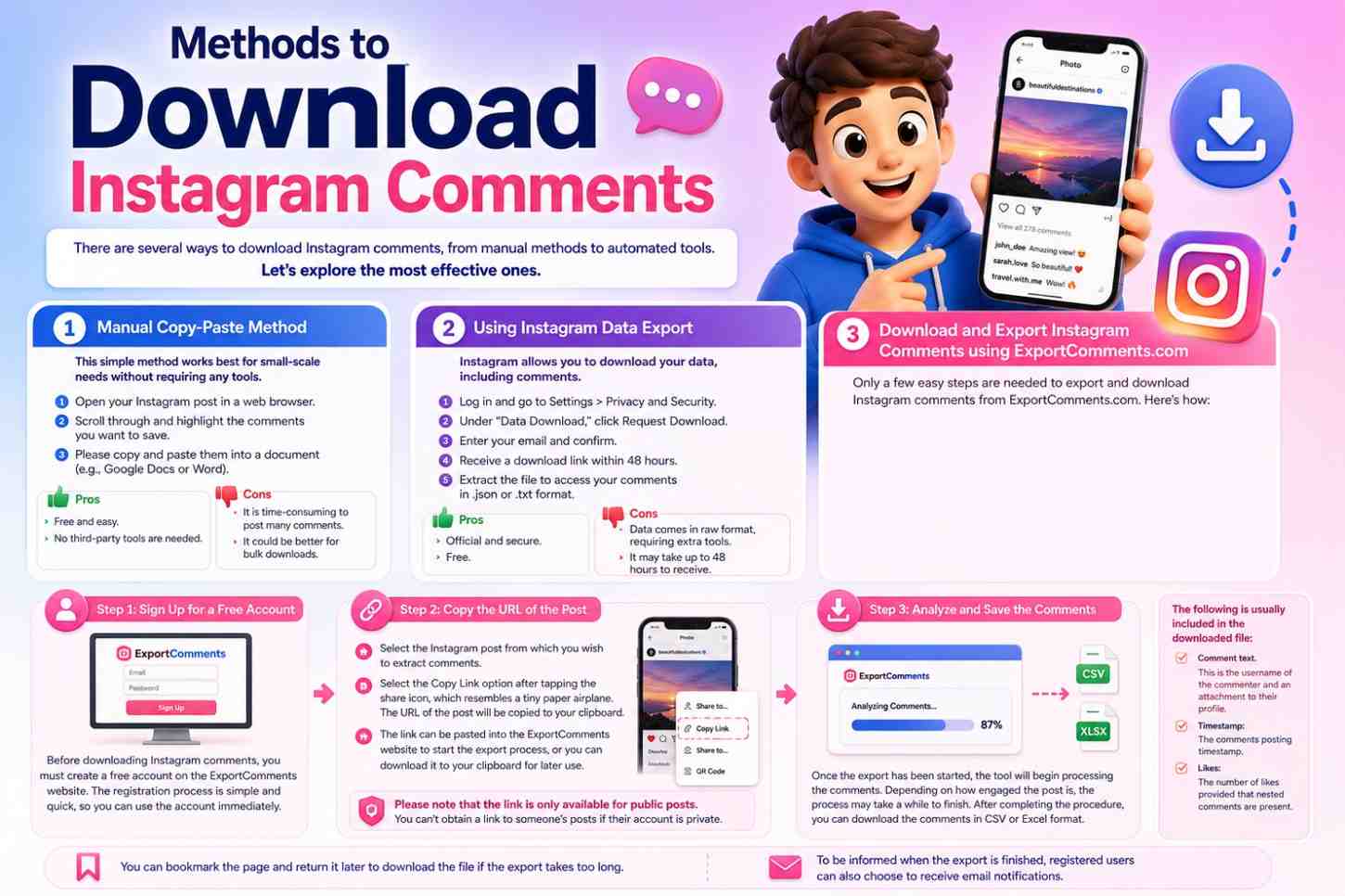
§ Manual Copy-Paste Method
This simple method works best for small-scale needs without requiring any tools.
- Open your Instagram post in a web browser.
- Scroll through and highlight the comments you want to save.
- Please copy and paste them into a document (e.g., Google Docs or Word).
- Pros
- Free and easy.
- No third-party tools are needed.
- Cons
- It is time-consuming to post many comments.
- It could be better for bulk downloads.
§ Using Instagram Data Export
Instagram allows you to download your data, including comments.
- Log in and go to Settings > Privacy and Security.
- Under “Data Download,” click Request Download.
- Enter your email and confirm.
- Receive a download link within 48 hours.
- Extract the file to access your comments in .json or .txt format.
- Pros
- Official and secure.
- Free.
- Cons
- Data comes in raw format, requiring extra tools.
- It may take up to 48 hours to receive.
§ Download and Export Instagram Comments using ExportComments.com
Only a few easy steps are needed to export and download Instagram comments from ExportComments.com. Here’s how:
§ Step 1: Sign Up for a Free Account
Before downloading Instagram comments, you must create a free account on the ExportComments website. The registration process is simple and quick, so you can use the account immediately.
§ Step 2: Copy the URL of the Post
Finding the link to the post you wish to export and download comments from is the first step in exporting Instagram comments after signing up. To accomplish this:
- Select the Instagram post from which you wish to extract comments.
- Select the Copy Link option after tapping the share icon, which resembles a tiny paper airplane. The URL of the post will be copied to your clipboard.
- The link can be pasted into the ExportComments website to start the export process, or you can download it to your clipboard for later use.
Please note that the link is only available for public posts. You can’t obtain a link to someone’s posts if their account is private.
§ Step 3: Analyze and Save the Comments
Once the export has been started, the tool will begin processing the comments. Depending on how engaged the post is, the process may take a while to finish. After completing the procedure, you can download the comments in CSV or Excel format.
The following is usually included in the downloaded file:
- Comment text. This is the username of the commenter and an attachment to their profile.
- Timestamp: The comments posting timestamp.
- Likes: The number of likes provided that nested comments are present. You can bookmark the page and return it later to download the file if the export takes too long. To be informed when the export is finished, registered users can also choose to receive email notifications.
What Are Some Important Notes on ExportComments?
There are a few essential things to keep in mind when exporting Instagram comments, such as how engagement data like likes may be included and the ability to export comments from multiple posts:
- Likes in Comments: If nested comments that respond to other comments are part of the export, likes on comments will only be included in the exported file.
- Exporting Several Comments: If you need to extract data from multiple posts simultaneously, the ExportComments tool facilitates the export of comments from various posts, saving you time.
- Private Accounts: If you follow a private account and they accept your Request, you won’t be able to export comments from posts made by that account. These instructions simplify downloading Instagram comments for backup analysis or contest selection. This quick, easy, and secure process allows you to manage your Instagram engagement and content better.
What Are the Benefits of Using ExportComments?
Using ExportComments offers several key advantages, making it an excellent tool for managing your Instagram data.
These are some of them:
- Time-Saving: Reducing the need for manual comment copying and pasting. With a few clicks, download every comment.
- Secure: Because ExportComments works with Instagram through the official API, they never request your Instagram username or password, protecting your privacy.
- Bulk management: Bulk management makes managing and analyzing vast amounts of data easier by allowing you to export comments from several posts simultaneously.
§ How do you download the Instagram Comments Scraper Extension?
With the Instagram Comments Scraper extension, you can download Instagram comments along with other valuable data such as:
- Text commentary.
- Post IDs.
- Profile photos and usernames.
- Dates and times.
- Web addresses for profiles.
How to Use Instagram Comments Scraper Extension?
The convenient Instagram Comments Scraper Chrome extension allows you to quickly extract, examine, and manage user interactions and comments from Instagram posts.
Here’s how to obtain and apply it:
- Install the Extension: Launch Chrome and navigate to the Chrome Web Store. Use the search bar to look up Instagram Comments Scraper. To install the extension, click it in the search results and select Add to Chrome.
- Set Up the Extension: After installing the extension, you should sign in or connect your account to begin scraping comments on Instagram. Adhere to the on-screen directions to make the extension usable.
- Apply the Tool: Open any public Instagram post. In the upper right corner of your browser, click the extension icon. The tool will automatically extract the comments from your selected post to scrape.
- Export the Information. You can export the scraped Instagram comments to an Excel or CSV file for additional analysis. Additionally, the extension might provide tools for examining user engagement and interaction data.
What Are the Benefits of the Instagram Comments Scraper Extension?
This Chrome extension is ideal for marketers, social media analysts, or anybody wishing to learn more about Instagram interactions. Here are its advantages:
- Efficiency: With just a few clicks, you can extract every comment from an Instagram post, saving you time.
- Insights: Analyze user sentiment comment trends and engagement levels to gain insights.
- Exportable Data: Obtain the information in an easily manageable format for use in research or reports.
Conclusion
Downloading Instagram comments can be constructive for several purposes, including user engagement analysis giveaways and preserving insightful comments before a post is removed.
Whether you work as a marketer, content creator, or company, this article shows you how to safely and swiftly export Instagram comments. Instagram comment downloads are a quick and efficient way to track user engagement, assess audience sentiment, and preserve significant exchanges.
The easy procedures mentioned above will enable you to quickly export comments from any open Instagram post to the public and utilize their insightful information. This procedure can save you time and effort, so start utilizing these techniques to maximize the use of your Instagram data!
How do you typically manage your comment data on Instagram? Share your tips and experiences with us in the comments below – we can’t wait to hear your thoughts!”