While Instagram Reels have become a popular way to share engaging short-form videos, only some enjoy them.
If you’re among those asking, “Is there a way to get rid of Instagram Reels?” and you find Reels distracting, overwhelming, or simply not your style, don’t worry—you’re not alone! This guide is for you.
Although users can only partially turn off Instagram’s Reels feature, there are a few tricks to circumvent this.
Ready to take charge and enjoy Instagram on your terms? Keep reading to learn how to stop Reels from taking over your experience, and have fun using Instagram in the way that works best for you!
Before we discuss the topic in detail, let’s take a quick look at the definition of Instagram Reels.
What Are Instagram Reels?
Before diving into how to get rid of Instagram Reels, it’s essential to understand what they are.
Instagram Reels are short, vertical videos that users can share with their followers or on the Explore page. They can include funny clips, dance routines, tutorials, or any other content users find interesting.
The feature was launched in response to the growing popularity of TikTok and aimed at keeping Instagram users engaged with bite-sized, shareable videos. However, for many Instagram users, Reels can become overwhelming and clutter the feed. Thankfully, there are ways to manage or even limit your exposure to Instagram Reels.
Can Instagram Reels Be Disabled to Get Rid of Them Completely?
The short answer is NO!
There is no specific setting on Instagram to disable Reels fully. As a fundamental component of Instagram’s user engagement strategy, Reels continue to be an integrated feature of the app.
Nevertheless, in this article, we will go over some doable strategies to lessen their presence.
Is there a way to get rid of Instagram reels? Keep reading!
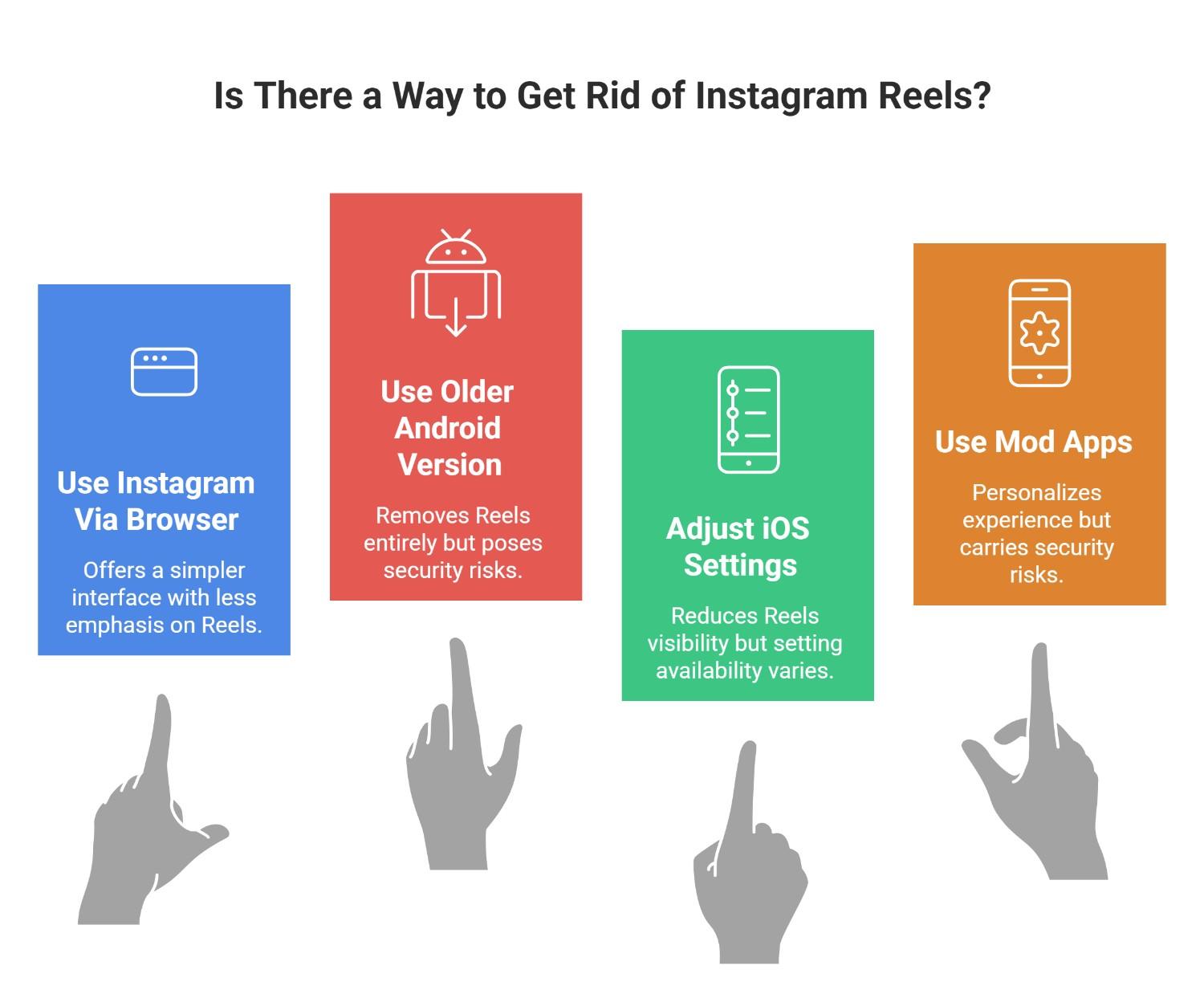
What Are the 4 Effective Ways to Minimize Instagram Reels?
While Instagram doesn’t offer a straightforward method to remove Instagram Reels from your feed altogether, there are a few strategies you can use to minimize their appearance.
These methods focus on limiting your interaction with Reels, customizing your feed, and using available settings to curate the content you see better.
1. Use Instagram Via a Browser
Instagram’s web version has a more straightforward interface and places less emphasis on Reels than the mobile app.
So, if you’re pondering to find a way to get rid of Instagram reels, this can be a solution:
- Launch a web browser such as Firefox, Chrome, or Safari.
- Go to Instagram’s website and sign in with your credentials.
- Explore your feed without having to deal with endless reels.
What Are the Cons?
Compared to the app, the web version’s user interface could be more intuitive.
2. Use an Older (Android-Only) Version of Instagram
The Reels feature is absent from older Instagram versions published before 2020. If you use Android, you can revert to a previous version to remove Instagram Reels.
- Look for and download an older version of the Instagram APK file online.
- The settings permit your device to install apps from unidentified sources.
- Install the previous version from the Google Play Store and turn off automatic updates.
What Is the Caution?
Using out-of-date apps could put your device at risk for security issues.
3. Adjust Reels Settings on iOS.
Although iOS users are unable to go back to earlier app versions, they can lessen the visibility of Reels by making specific settings changes to get rid of Instagram Reels.
- Go to your profile after launching the Instagram app.
- Choose Settings by tapping the three-line menu in the upper-right corner.
- Navigate to Account Preferences Reels.
- If the Show Reels option is available, turn it off.
What Is the Note?
App updates affect this setting availability.
4. Use Instagram Mod Apps
By turning off Reels on Instagram, users can personalize their Instagram experience with third-party apps like Instander. However, these apps carry some risks which you should consider.
- Install a reliable mod app such as Instander.
- Turn on downloads to your device from unidentified sources.
- To block Reels, install the app and adjust the settings.
What Is the Caution?
Mod apps could jeopardize the security of your data. If you see any suspicious activity, remove it immediately.
How to Delete Your Own Instagram Reels?
To delete Instagram Reels that you have shared, take the following actions:
- Go to your Instagram profile.
- Go to the Reels tab.
- You can choose which Reel to remove.
- To delete something, tap the three dots in the upper-right corner.
Alternative Methods to Get Rid of Instagram Reels?
Essentially, Instagram is designed so that users can see and engage with Reels, which they believe enhances the experience on the platform.
But the following can be helpful to get rid of Instagram Reels:
– Reporting
Reels that are inappropriate can be reported to Instagram by this method:
- Tap the three dots beneath the Reel.
- Choose Report.
- Follow the instructions if the Reel goes against community guidelines.
– Personalize Your Explore Page
You can personalize your Explore page and limit the number of Reels that are displayed to you according to your interests in the following method:
- Tap the magnifying glass icon.
- Choose Explore.
- Select See Fewer Reels.
– Control Reels’ Notifications
To manage Reels notifications, do the following:
- Open your profile.
- Tap the three lines.
- Choose Settings.
- Navigate to Notifications.
- Change your preferences under the Reels section to control Reels notifications.
– Use the “Not Interested” Feature
One of the simplest ways to reduce the number of Reels on your Instagram feed is to tell Instagram that you are not interested in Reel content.
When you come across a Reel that doesn’t appeal to you, follow these steps:
- Step 1: Tap the three-dot menu in the top-right corner of the Reel.
- Step 2: Select “Not Interested” from the menu.
- Step 3: Instagram will reduce the number of similar Reels appearing in your feed and, over time, adjust the content it shows you.
By marking Reels as “Not Interested,” you’re teaching Instagram’s algorithm to show you less of this content.
Note: As a last option, you can limit your Instagram Reels viewing by setting a daily timer for when to watch them. Once the timer goes off, exit the app and engage in another activity like reading or walking. Additionally, opt for watching Stories instead of browsing the Reels tab, as Stories have a natural conclusion, unlike Reels, which encourage endless scrolling.
Conclusion
If you’re asking, “Is there a way to get rid of Instagram Reels?” The techniques covered in this article can be a game-changer. Whether you’re using Instagram on a desktop, iOS, or Android, there’s always a way to tailor your Instagram according to your interests.
Instagram Reels cannot be totally removed, but you can lessen their negative effects on your browsing experience by using the techniques mentioned above. Investigate the options to tailor your Instagram usage to your tastes, whether you’re using desktop iOS or Android.
Have you tried any of these techniques? Please share your thoughts and experiences to help us improve our Instagram experience!