What does an Instagram data download include? More than you might think! From every post, like, and comment to messages and insights about your activity, it’s a deep dive into your digital life.
Downloading your data can be eye-opening, whether you want to backup memories, analyze your habits, or see what Instagram knows about you. Curious about what’s in your Instagram archive? Let’s take a closer look!
What is included in Instagram download data?
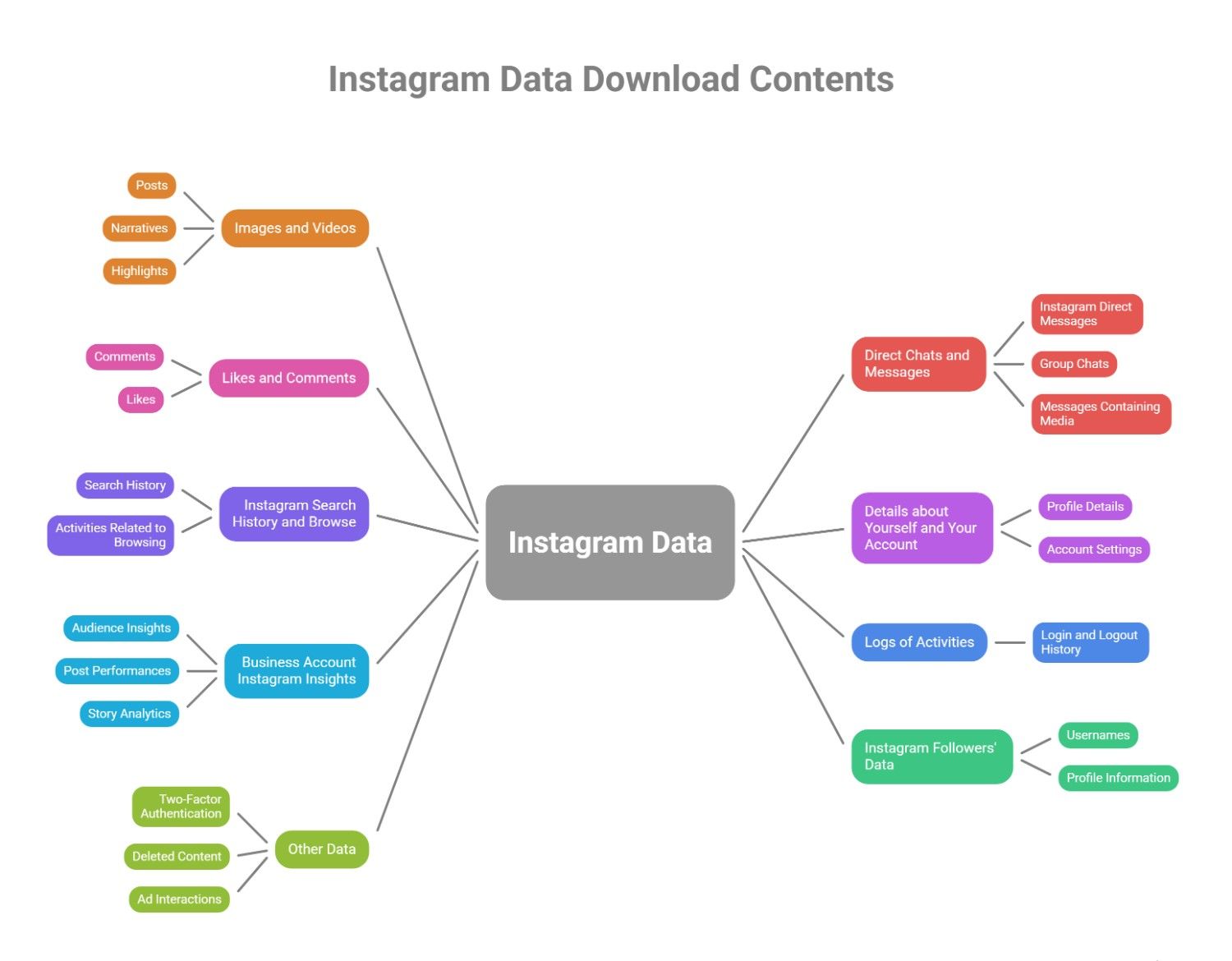
In the following article, we have gathered Instagram backup data downloaded in 9 sections, each offering valuable insights into your activities and interactions on the platform. So, if you are curious about “What Are the Sections of Instagram Data Download?” follow us to continue:
1. Images and Videos
All of the multimedia content you’ve posted on Instagram is included here, and this is what it covers:
- Posts: All of your uploaded images and videos to your feed.
- Narratives: Historical and no longer relevant stories, including those that have been archived.
- Highlights: Any stories you have marked as critical.
2. Direct Chats and Messages
This will be included in your data download about chats and messages:
- Instagram Direct Messages: All of your private exchanges with other users.
- Group Chats: Every group discussion in which you have taken part.
- Messages Containing Media: Any pictures, videos, or other media files shared during conversations.
3. Likes and Comments
Instagram stores and includes all your interactions with posts, such as Instagram comments and likes:
- Comments: Any remarks you have left on posts, including likes and replies to other people’s remarks.
- Likes: You like every Instagram post. This section provides insightful information about your engagement patterns, the kinds of content you find interesting, and your interactions with other users.
4. Details about Yourself and Your Account
A variety of personal information and account settings are also included in your Instagram account information.
- Profile Details:
- Your contact details, linked accounts, bio profile picture, and username.
- Your Instagram privacy settings and who can message you.
- Account Settings:
- Details about your account’s public or private status and any additional third-party apps or services connected to it.
5. Instagram Search History and browse
Instagram keeps track of and saves your browsing history and search terms. The data download will display these sections:
- Search History: The locations, hashtags, and accounts you have looked up.
- Activities Related to Browsing: The articles, narratives, or profiles you have engaged with.
You can learn more about your interests, identify trends in your online behavior, and comprehend your content preferences with the help of this data.
6. Logs of Activities
The activity logs capture a detailed record of interactions on Instagram, including:
- Login and Logout History: The devices and times you used to access or log out of your account.
This information can assist you in keeping an eye on the security of your account and spotting any illegal access.
7. Business Account Instagram Insights
For users with business or creator accounts, Instagram provides more in-depth analytics, which include:
- Audience Insights: Information about the demographics of those responding to your posts.
- Post Performances: Each post’s metrics include engagement, reach, and impressions.
- Story Analytics: Information about how many people have viewed, responded to, and interacted with your stories.
8. Instagram followers’ data
Instagram’s data download also includes comprehensive details on your followers and the following lists, including Usernames and profile information of your followers and the accounts you follow.
9. Other Data
The following might also be included in your Instagram data download:
- Information about Two-Factor Authentication (2FA): If you have turned on two-factor authentication for extra security.
- Deleted Content: If you request a data download, it may contain information about the content you believe to be permanently deleted because Instagram keeps deleted messages, posts, or comments for a while.
- Ad Interactions: Details about the ads you’ve clicked on or saved, among other things.
How to Download Your Instagram Data?
This comprehensive guide will assist you in gaining access to your Instagram data for security backup or personal analysis purposes.
On a desktop:
- Select the menu icon in the Instagram website’s lower left corner.
- After that, choose Settings.
- Choose Your information and permissions after clicking Accounts Center.
On a mobile device (iOS or Android):
- Tap your profile picture in the lower right corner to access it.
- Choose Accounts Center by tapping More options (three horizontal lines) in the upper right corner.
- Select Your information and permissions.
How to Access the Data You Downloaded?
To access the data you downloaded from Instagram, follow these steps:
- Extract the File: Your data is downloaded as a ZIP file. Locate it on your device and extract the contents.
- Open the Folders: Inside, you’ll find multiple folders containing different data types, such as messages, photos, comments, and profile info.
- View JSON or HTML Files: Most data are stored in JSON format, which you can open with a text editor or a JSON viewer. Some files may be available in HTML format for easy browsing.
Review your data to check your activity, secure your content, or manage your privacy settings.
Summary
Downloading your Instagram account activity gives you a complete view of your activities, helping you secure your content, evaluate your online presence, or enhance privacy.
What does Instagram data download include? It contains your posts, comments, messages, profile info, and more. This data can be valuable whether you’re backing up memories or reviewing your interactions. Have you downloaded yours yet? Please share what you found most helpful with us!
How long does it take for Instagram to send my data?
It may take up to 48 hours, depending on the account size.
Does Instagram data download include everything?
No, it includes most account data but may not have all the details, like some deleted content.
What data can be collected from Instagram?
Posts, stories, comments, likes, messages, searches, followers, and profile details.
How to request a download of your data?
Go to Settings > Your Activity > Download Your Information, request the file, and wait for the email.
How do I open my Instagram data file?
Extract the ZIP file, then open JSON or HTML files using a text editor, browser, or JSON viewer.